VLC Streamer
- 4.0
- Rating
- 10.00K
- Installs
- $2.99
- Price

 Analysis by App-foxy
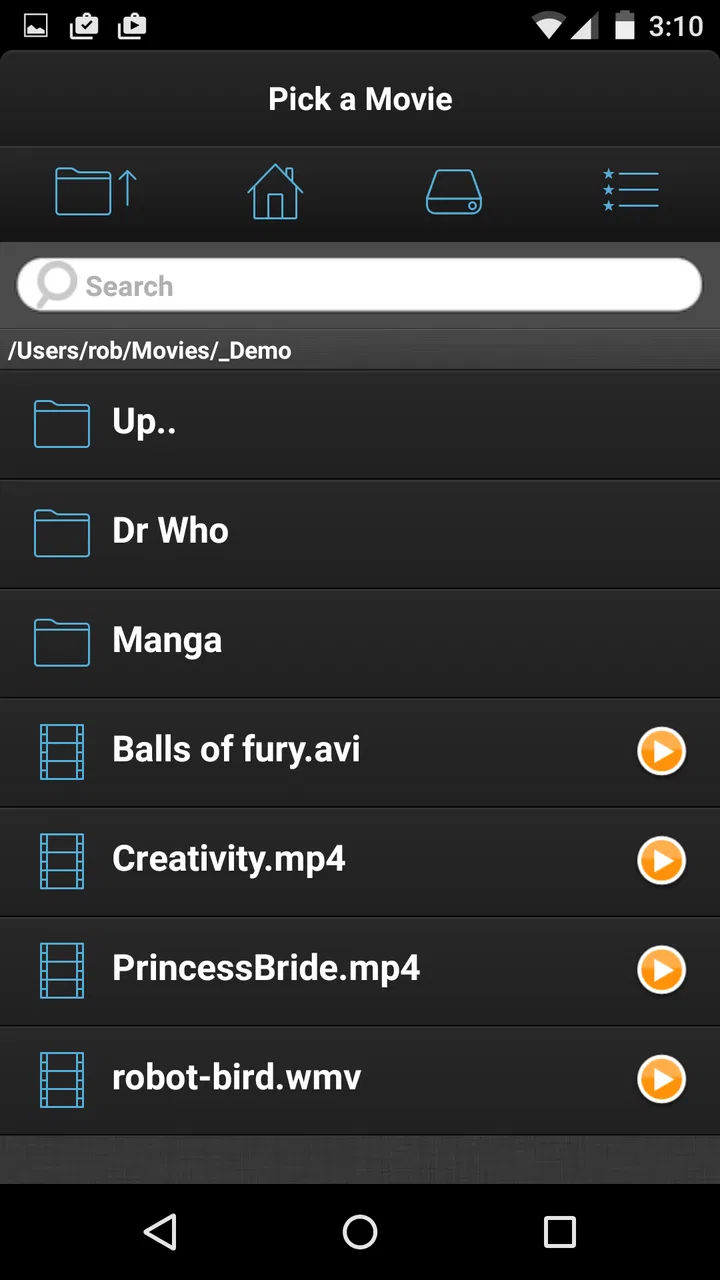
I like the idea behind VLC Streamer because it solves a very ordinary problem: the video is on a computer, but I want to watch it somewhere else in the house. Instead of moving a file to my phone or tablet, this app is designed to let the Android device act as the viewing screen while the computer supplies the video. That makes it more focused than a general mobile player, and also means the quality of the experience depends on the whole home setup rather than the app alone.
Developed by Hobbyist Software Ltd, this is a paid video player and editor app for Android. It costs $2.99, carries an Everyone age rating, and has built a modest but meaningful audience of over 10K installs. Its average rating is 4.0 from over 500 ratings, with more than 70 written reviews, which suggests a generally positive reception without implying that it will suit every network, device, or viewing habit.
After spending time with the app, my main impression is that it is best understood as a remote video-streaming tool for a home network, not as a replacement for every video app on a phone. When the connection and source computer are ready, it can make watching personal movie files pleasantly convenient. When I want instant playback from a cloud service, social platform, or subscription catalog, I would choose a different kind of app.
You May Also Like

 Pandora - Music & Podcasts
Pandora’s Music Is Easy to Start, but Harder to Recover
Pandora’s strength is its low-effort path from a seed to a station. Its weak spot is how much confidence it asks you to place in connection, setup, and quiet recovery.

 AccuWeather: Weather Radar
AccuWeather Review: A Quick, Clear Forecast for Everyday Decisions
For everyday plans, the best forecast is the one you can understand quickly. AccuWeather makes rain timing, radar, and local conditions easy to act on, with a few trade-offs.

 Hill Climb Racing
Why Hill Climb Racing Still Turns Crashes Into One More Run
A tiny car, a bumpy hill and one more upgrade: Hill Climb Racing keeps resurfacing because its simple chaos makes every near-miss feel personal.

 AliExpress - Shopping App
AliExpress Makes Global Shopping Feel Personal, but Shoppers Bear the Risk
AliExpress turns a global marketplace into a pocket-sized discovery engine. Its reach is useful, its shopping loop compelling, and its trade-offs easy to miss.

 Lords Mobile: Kingdom Wars
Lords Mobile Is a Kingdom-Building Routine, Not a Quick Match
A case-by-case verdict on the building, battles, device demands, and social commitments that make Lords Mobile rewarding for some players and exhausting for others.

 PDF Scanner app - TapScanner
TapScanner Makes Paperwork Easier to Capture, Check, and Share
TapScanner makes scanning with a phone feel less like a rescue operation and more like a dependable step in getting work done. Its capture tools are useful, though not flawless.
More From Our News Desk
View All News


How the streaming experience feels in everyday use
I find the day-to-day appeal of this setup is less about adding another player and more about choosing where a video is watched without first reorganizing the file. In this section, I’ll focus on the small decisions that make that arrangement feel natural, especially matching the screen and viewing session to the way I use the room.
Speed depends on the path between the computer and the screen
The first thing I would explain to a friend is that VLC Streamer does not magically make a large movie file local. The video still has to travel from the computer to the Android device, so the perceived speed comes from several points at once: how quickly the computer can prepare the stream, how busy the home network is, and how well the receiving device handles playback. That is why two people can have very different impressions of the same app.
In a calm home-network situation, starting a movie feels much more direct than copying a file manually. I can leave the video where it already is and use the mobile screen as the place to watch. The convenience is especially noticeable when the computer is in another room, when the file is too large to move comfortably, or when I simply do not want to manage duplicate copies.
There is a practical trade-off here. A local player that already has the file on the phone usually gives the most predictable start time because it is not waiting for another device. VLC Streamer earns its place by removing that transfer step. If the source machine is awake and the network behaves well, that is a worthwhile exchange. If either condition is unreliable, the convenience can turn into waiting.
I also would not judge the app by the speed of a single short clip. A short file can hide problems that become obvious during a full-length movie. Longer viewing exposes whether the connection remains steady, whether the source computer stays available, and whether the Android device continues playing comfortably. For me, the important question is not only “does it start?” but “does it remain usable after I stop thinking about it?”
What happens during heavier viewing sessions
The demanding moment is not necessarily pressing play. It is keeping a continuous stream moving while the computer and mobile device are both doing their parts. A high-resolution movie, a busy wireless network, or a computer handling other work can make the experience less forgiving than a small, simple video. I would therefore test the app with the type of content I actually watch rather than assuming that success with one file guarantees success with everything.
A useful routine is to prepare the viewing environment before settling in. I would wake the computer, confirm that the intended file is available, and avoid starting the first test from the farthest room in the house. This is not glamorous advice, but it separates a problem with the streaming arrangement from a problem with the app itself. Once the basic path works, moving around the house becomes a more meaningful test.
For an evening movie, I would also avoid treating the phone like a passive television. The display may be smaller, battery use can matter, and the wireless connection may change as I move. A tablet is likely to make more sense for relaxed viewing, while a phone is useful when I want personal playback without occupying the main television. The app’s value is strongest when that distinction matches my routine.
One non-obvious advantage is that streaming can reduce the need to keep several large copies on the Android device. That is helpful when storage is tight or when I watch a file once and do not want it sitting on the phone afterward. The trade-off is that I am exchanging storage independence for dependence on the computer and network. I see this as a deliberate workflow choice, not an automatic upgrade.
Reliability is about recovery as much as playback
For me, a streaming app earns trust when it behaves sensibly after an interruption. Home networks are not perfectly controlled environments: another person may begin a download, the phone may change position, or the computer may become unavailable. VLC Streamer is most useful when I plan around that reality instead of expecting the same certainty as an offline file.
I would start important viewing with the source computer already ready rather than assuming it will wake, remain available, or recover from every interruption without attention. That small habit improves reliability because it removes one avoidable variable. If I am watching something I cannot easily restart, I prefer having a local copy or another dependable playback option available.
The app also makes more sense for casual home viewing than for a situation where uninterrupted playback is essential. A personal movie night can tolerate a quick check of the network. A presentation, travel journey, or long trip without dependable access is a different matter. In those cases, an offline player is the safer choice because the file and the playback path are on the same device.
Another useful way to think about recovery is to keep the setup simple. I would avoid adding unnecessary network complications during the first test and would begin with one Android device and one computer. Once that arrangement is understood, I could decide whether it fits more rooms or family members. This staged approach is more reliable than installing the app and immediately expecting it to replace every playback method in the house.
Device limits and the right Android role
The current version is 2.57 (3904), and the app requires Android 7.0 or later. That gives it a clear compatibility boundary: older Android devices are not the intended home for this version. On a supported device, the more important practical limits are likely to be screen comfort, battery condition, wireless quality, and how the source computer handles the video being streamed.
I would choose a tablet when I want a sofa-friendly screen and a phone when convenience matters more than size. A phone works well for a private viewing session, checking a recording, or watching while someone else uses the television. It is less appealing for a long film if I need to keep holding it or if the battery is already low. Those are not failures of the app; they are reasons to match the app with the right device.
Resource demands should also be considered across the two ends of the setup. The Android device must receive and display the stream, while the computer remains involved in supplying it. If the computer is old, heavily occupied, or already struggling with the source file, the mobile screen cannot fully compensate. I would test a representative file before relying on this arrangement for regular viewing.
There is a subtle benefit to using a dedicated streaming arrangement rather than filling the Android device with media: the phone remains less cluttered. I can keep personal storage for photos, downloads, and apps instead of reserving space for movies. The downside is that this is not a good fit for commuting, flights, or locations where the computer will not be reachable. The app is home-oriented by design, and I would keep that expectation firmly in mind.
Where it beats ordinary alternatives, and where it does not
Compared with copying videos to the phone and opening them in a conventional local player, VLC Streamer saves time and storage management. I do not need to decide which files deserve permanent space on the Android device. I can leave a collection on the computer and watch selectively. That is the clearest reason I would recommend it to someone who already keeps movies on a home computer.
Compared with broad streaming services, it offers a different kind of control: I am watching my own files rather than browsing a catalog that may change. That makes it useful for personal recordings, downloaded material, or a carefully organized collection. It is not the better option for someone who mainly wants a search box, instant online content, user profiles, or a service that handles the entire delivery chain.
Compared with a full media-center setup, this app is more focused and potentially easier to justify if all I want is to watch on Android. A larger home-entertainment system may be better for several televisions, multiple users, elaborate libraries, or a living-room remote-control experience. VLC Streamer is attractive when the requirement is narrower: get a video from the computer to an Android screen without moving the file first.
That distinction also helps explain why I would not recommend it universally. If a friend stores everything locally on a phone, the added computer dependency is unnecessary. If another friend watches only online services, this app addresses the wrong problem. If someone expects a flawless experience across weak wireless connections, I would advise testing carefully before paying for a routine they cannot tolerate when it fails.
Small workflow choices that make a real difference
My first tip is to test the exact viewing path, not just the app installation. I would use the computer that normally stores my videos, the Android device I intend to use, and the room where I usually sit. This reveals whether the setup fits real life. A successful test beside the router tells me far less than a successful test from the sofa.
My second tip is to treat file selection as part of performance planning. I would begin with a video that represents my normal collection, then try a longer or more demanding example if that is what I usually watch. This avoids building confidence around an easy file and discovering the real limitation halfway through an evening.
My third tip is to keep an offline fallback for situations where reliability matters. VLC Streamer is convenient precisely because it avoids copying files, but that convenience is conditional. For travel, weak connectivity, or an important presentation, I would rather prepare the file locally. For ordinary home viewing, I am happy to accept the network dependency because it saves storage and effort.
My fourth tip is to choose the Android device according to the session. A tablet makes the arrangement feel closer to a small personal television, while a phone is better for short, private viewing. I would not blame the app for an uncomfortable screen or an exhausted battery; I would decide whether the particular device makes the streaming workflow worthwhile.
Finally, I would keep expectations realistic about recovery. If playback stops, I would check the source computer and home network before repeatedly restarting the Android app. That diagnostic order matters because the app is only one part of the chain. Understanding that relationship makes troubleshooting quicker and prevents me from mistaking a network interruption for a permanent application problem.
My performance verdict
After weighing the convenience against the dependencies, I see VLC Streamer as a practical specialist rather than an all-purpose video solution. Its strongest performance is perceived convenience: the file stays on the computer, while the Android device becomes the place where I watch. For a supported device on a dependable home network, that can feel faster and easier than copying media around.
I would recommend it to Android users who maintain a personal video collection on a computer, want to save mobile storage, and mainly watch at home. The $2.99 price is reasonable for that focused workflow if it replaces a repeated nuisance. The Everyone rating also makes it broadly approachable, although suitability still depends much more on the household setup than on age.
I would skip it if I need offline playback, depend on online catalogs, use an Android device below Android 7.0, or expect a streaming arrangement to work without any attention to the source computer and network. In those cases, a local player, an online service, or a more complete media-center solution may be the better tool.
My final judgment is positive but specific: this app is worth considering when the problem is “my videos are on the computer, but I want to watch them on Android.” It is not trying to solve every video problem, and that narrow purpose is both its strength and its limitation. If that exact situation describes your home, I think it is a sensible purchase; if it does not, the usual alternatives will probably feel simpler.
FAQs for VLC Streamer
01What is VLC Streamer and what can I use it for?
VLC Streamer lets you watch videos stored on a computer from an Android or iOS device over a local Wi-Fi network. It works alongside a computer application that prepares and streams the selected video to your phone or tablet. This makes it useful for watching films, TV episodes, or personal recordings without transferring the entire file to your mobile device first.
02Does VLC Streamer work without an internet connection?
Yes, VLC Streamer is primarily designed for streaming over your local wireless network, so an active internet connection is usually not required once the computer and mobile device are connected to the same Wi-Fi network. You do need the companion VLC Streamer software running on the computer. Performance depends on Wi-Fi strength, network congestion, and the distance between your devices.
03Which video files and devices are supported?
VLC Streamer is intended to play many common video formats, but compatibility can vary depending on the operating system, file encoding, resolution, and the version of the app or desktop streamer. It is available for mobile platforms such as Android and iOS, while the computer component must be installed on a supported desktop operating system. Checking current store and developer requirements is recommended before downloading.
04Do I need to install software on my computer to use VLC Streamer?
Yes. The mobile application does not normally stream files directly from your computer without assistance. You need to install and run the VLC Streamer Helper or equivalent desktop component, choose the folders or videos you want to access, and keep the computer awake while streaming. The computer and mobile device should also be connected to the same local network.
05Is VLC Streamer free, and are there any limitations to consider?
VLC Streamer may be offered in different editions depending on the platform, including free and paid versions, so pricing and included features can change over time. Potential limitations may include advertisements, restricted playback options, desktop setup requirements, or reduced performance with high-resolution videos. Review the current app-store listing before downloading to confirm cost, permissions, and supported features.
Pros
- Streams videos from your computer to mobile devices over Wi‑Fi.
- Supports many popular video formats without extra conversion apps.
- Offers subtitle support for compatible video files.
- Playback controls include seeking
- pause
- volume
- and orientation options.
- Useful for watching locally stored content without filling device storage.
Cons
- Requires a computer running the companion streamer application.
- Streaming quality depends heavily on your Wi‑Fi network.
- Setup may be confusing for users unfamiliar with network sharing.
- Some advanced playback features may be limited compared with VLC media player.
- Battery usage can increase during extended high-quality streaming sessions.

VLC Streamer
Gallery